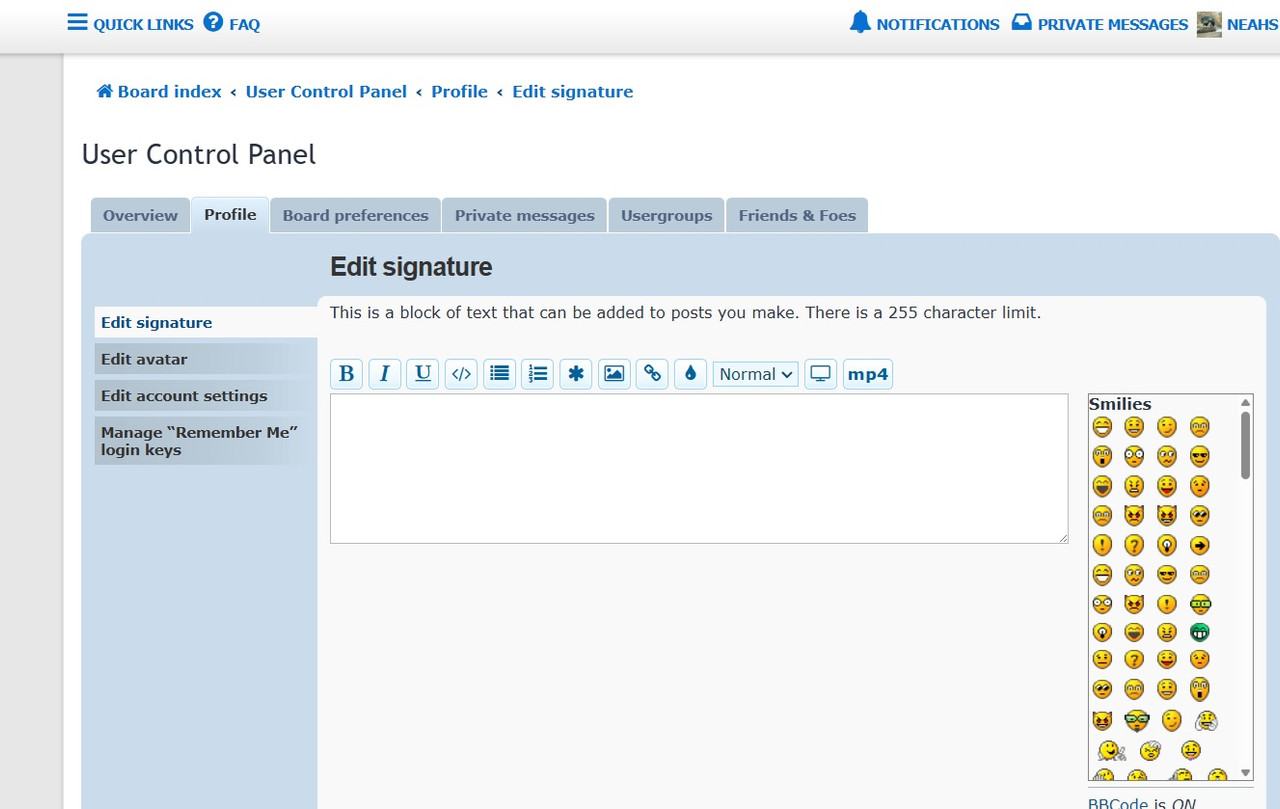
Been all over the control panel/profile settings, how does one add their location to the avatar side bar? this helps greatly when deciding to reply to posts in the classifieds determining how far I must drive for my new toy
Also, will there be a "New Posts" tab? whenever logging on at PAFOA, I'd always hit it to see what's new vs sorting through the indexes
profile settings ?
-
SgtRecon

- Member
- Posts: 14
- Joined: Sat Jan 31, 2026 4:18 pm
- Location: Narvon, Lancaster County
- Has thanked: 1 time
- Been thanked: 2 times
Re: profile settings ?
got it, the new posts is in the pulldown of the quick links, upper left corner of the page
Thanks Jay, you are doing a tremendous job here
-
MG34_Dan

- Newb
- Posts: 5
- Joined: Sat Jan 31, 2026 12:43 pm
- Location: Sugarloaf Township, Luzerne County
Re: profile settings ?
OK. I'm an idiot. How does a member add a location to their profile/avatar view?
"Elections have consequences, and at the end of the day, I won."
Barack Hussein Obama, January 23, 2009
Barack Hussein Obama, January 23, 2009
-
SgtRecon
- Member
- Posts: 14
- Joined: Sat Jan 31, 2026 4:18 pm
- Location: Narvon, Lancaster County
- Has thanked: 1 time
- Been thanked: 2 times
Re: profile settings ?
Click on your profile (pull down menu at your user name upper right corner of page) the down arrow
click on profile, when your profile page appears click on [ Edit profile ] next to your user name on the profile page, the edit page will appear...took me a while from bouncing around page to page to start to figure things out, my feelings are that this forum is going to be much easier to navigate than POFOA once i know my way around, next I will see if downloading pictures will be better
-
NEAHS

- Newb
- Posts: 4
- Joined: Sat Jan 31, 2026 12:10 pm
- Location: Upper Mount Bethel
- Has thanked: 1 time
Re: profile settings ?
I do not have an option to edit profile.SgtRecon wrote: ↑Sat Jan 31, 2026 7:56 pm
Click on your profile (pull down menu at your user name upper right corner of page) the down arrow
click on profile, when your profile page appears click on [ Edit profile ] next to your user name on the profile page, the edit page will appear...took me a while from bouncing around page to page to start to figure things out, my feelings are that this forum is going to be much easier to navigate than POFOA once i know my way around, next I will see if downloading pictures will be better
But I have noticed that I'm in both the Newly Registered Users and Registered Users groups. Where you are only in the Registered Users.
Does Jay need to do something to your account to let you edit profile?
-
JaySmith
 Verified
 - Founding Father
- Posts: 2120
- Joined: Mon Aug 26, 2024 10:22 pm
- Location: SE PA
- Has thanked: 3 times
- Been thanked: 28 times
Re: profile settings ?
Under user control panel, you should be able to click the profile tab, edit profile, and location should be there.
- image.png (55.56 KiB) Viewed 85 times
iAnal
-
JaySmith Verified
- Founding Father
- Posts: 2120
- Joined: Mon Aug 26, 2024 10:22 pm
- Location: SE PA
- Has thanked: 3 times
- Been thanked: 28 times
Re: profile settings ?
If you're not seeing it, can you screenshot what you see?
To screenshot, hold Windows Key + Shift + S then click and drag your mouse to select what you want to screenshot. If you are in the post reply or full editor, where you are typing, you can then hit ctrl+V and the image will auto upload from your clipboard.
To screenshot, hold Windows Key + Shift + S then click and drag your mouse to select what you want to screenshot. If you are in the post reply or full editor, where you are typing, you can then hit ctrl+V and the image will auto upload from your clipboard.
iAnal
-
NEAHS
- Newb
- Posts: 4
- Joined: Sat Jan 31, 2026 12:10 pm
- Location: Upper Mount Bethel
- Has thanked: 1 time